Faded: A Timeless Display Font for Modern Creations
Fonts play a crucial role in visual communication, shaping the way messages are perceived and understood. Among the many display fonts available today, Faded stands out as a unique and versatile option that brings a nostalgic yet contemporary feel to any design project. Whether you're an entrepreneur designing a logo, a blogger crafting headers, or a hobbyist working on a personal creative endeavor, Faded can add character and charm to your work.
What Is Faded?
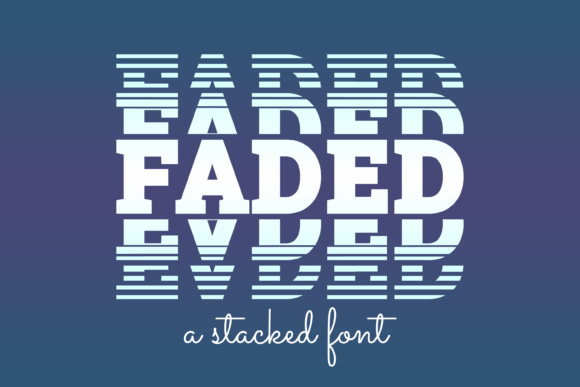
Faded is a decorative typeface designed with subtle imperfections that mimic the natural wear and tear of hand-painted signs or vintage typography. Its soft edges, uneven strokes, and weathered appearance give it a distinct personality that sets it apart from more formal or structured fonts. This makes it particularly well-suited for use in branding, signage, invitations, social media graphics, and other projects where aesthetic appeal takes precedence over readability in body text.
Why Choose Faded?
- Unique Visual Appeal: The font’s aged look adds warmth and authenticity to designs, especially those with rustic, vintage, or artistic themes.
- High Customization: Many versions of Faded come with alternate characters, ligatures, and stylistic variations, allowing designers to tailor their text to fit the mood of the project.
- Wide Applicability: From wedding invitations to coffee shop logos, Faded works across multiple industries and styles due to its adaptability.
- SEO-Friendly Usage: When used correctly in digital content (like headers or banners), it enhances user experience without compromising accessibility.
Common Mistakes When Using Faded
While Faded offers a lot of creative potential, there are several common pitfalls users tend to overlook when selecting or applying this font. These mistakes can impact the effectiveness of the design and even lead to miscommunication or poor user engagement.
Mistake 1: Using Faded for Body Text
Display fonts like Faded are not meant for long blocks of text. Their ornate details and irregular spacing can make reading difficult, especially at smaller sizes or on mobile devices. If you're tempted to use Faded throughout a website or brochure, consider using it only for headlines or key phrases and pairing it with a clean sans-serif or serif font for body copy.
Better Approach:Use Faded sparingly—for titles, taglines, or short captions—where legibility isn't the top priority but visual impact is. For example, a lifestyle blog might feature Faded in the header to evoke a sense of nostalgia while using Arial or Georgia for the main content.
Mistake 2: Ignoring Color Contrast
The faded aesthetic often includes lighter tones and subtle shading, which can be lost if the font is placed against a similarly light background. Low contrast between text and background can reduce readability and negatively affect how the message is received by the audience.
Better Approach:Always test your color combinations before finalizing a design. Pairing Faded with darker backgrounds or bold colors can enhance its features and ensure it remains visible and impactful. Try overlaying it on deep navy blue or forest green for a striking effect.
Mistake 3: Not Checking Licensing Before Downloading
Many users assume all free fonts can be used for commercial purposes, but this isn’t always the case. Faded may have different licensing options depending on the platform from which it's downloaded. Misusing a font under incorrect licensing terms can lead to legal issues, especially for businesses or freelancers working on client projects.
Better Approach:Before downloading or purchasing Faded, review the license agreement carefully. If you’re using it for a commercial project, ensure the license covers such usage. You can also opt for premium versions of the font from reputable foundries like Adobe Fonts or Google Fonts, which often include clear and broad usage rights.
Mistake 4: Overlooking Alternate Characters
Faded typically comes with a range of stylistic alternates and ligatures that can significantly enhance the overall look of the text. However, many designers fail to explore these options, resulting in a less refined or dynamic composition.
Better Approach:Take time to explore the font’s full capabilities. Use tools like Adobe Illustrator or Photoshop to access OpenType features, or check online font viewers that showcase alternate glyphs. For instance, replacing standard “th” with a connected ligature can make the word “Thank You” look far more elegant.
Mistake 5: Neglecting Kerning and Spacing Adjustments
Decorative fonts like Faded often require manual adjustments to spacing and kerning to look balanced and professional. Automated settings may not account for the font’s irregular structure, leading to awkward letter pairings or inconsistent spacing that distracts the viewer.
Better Approach:After inserting your text, go through each line to adjust the spacing manually. Look for tight or loose pairs, especially around letters like “A,” “T,” and “Y,” which often need tweaking. In Canva or Figma, you can fine-tune these elements easily to achieve a polished result.
When to Avoid Faded
Not every project will benefit from using Faded. It’s essential to understand when it might not be the best choice:
- If the design needs to convey professionalism or clarity above all else, such as in legal documents or technical manuals.
- In multilingual contexts, unless the font supports the necessary characters and diacritics.
- When accessibility is a concern—decorative fonts can be challenging for screen readers or visually impaired users if not properly formatted.
In these cases, opting for a more readable typeface ensures your message is communicated effectively. Always ask yourself: does the font support the purpose of the design, or is it just there for show?
Real-World Examples of Faded in Action
Here are a few scenarios where Faded shines:
Example 1: Brand Identity for a Vintage Café
A local café owner wanted to create a warm, welcoming brand identity that reflected the building’s history. They chose Faded for the logo and menu headings, giving the space a cozy, retro vibe. The font paired beautifully with a muted color palette and handwritten-style supporting text, creating a cohesive and inviting look.
Example 2: Social Media Banners for a Lifestyle Blog
A wellness blogger used Faded in their Instagram banner to highlight seasonal posts like “Spring into Wellness.” The font’s texture and style matched the blog’s aesthetic perfectly, making the content stand out in a sea of uniform digital text.
How to Get Started with Faded
Getting Faded into your design toolkit is simple, but it requires some planning to ensure it meets your needs:
- Download Responsibly: Visit trusted font websites or marketplaces and download Faded only after confirming the license fits your intended use.
- Test Across Devices: Preview Faded on both desktop and mobile screens to see how it renders at different sizes and resolutions.
- Pair Thoughtfully: Combine Faded with complementary fonts to maintain hierarchy and balance in your layout.
- Optimize for Web: If using Faded on a website, convert it to a web-safe format like WOFF or TTF and ensure it loads quickly without affecting performance.
Alternatives to Consider
If Faded doesn’t quite align with your project’s tone or requirements, here are a few alternatives worth exploring:
- Script Fonts: For a similar handcrafted feel, try fonts like Great Vibes or Lora.
- Rustic Fonts: Fonts like Rock Salt or Creepster offer a similar distressed look with more structural variation.
- Modern Display Fonts: For a cleaner yet still eye-catching alternative, consider Playfair Display or Merriweather, which provide elegance without the same level of texture.
Remember, the goal is to enhance your message—not obscure it. Choose a font that complements your content and audience expectations.
Final Tips for Using Faded Effectively
To get the most out of Faded, keep these tips in mind:
- Limit its use to short texts where legibility isn’t compromised.
- Enhance the visual with textures, shadows, or gradients that match the font’s theme.
- Use high-quality images or mockups to place the text in realistic environments, such as chalkboards or wooden signs.
- Don’t forget to proofread! The font’s stylized nature can sometimes hide typos or formatting errors.
By avoiding common missteps and following best practices, you’ll unlock the full potential of Faded and elevate your designs with minimal effort and maximum impact.
Conclusion
Faded is more than just another pretty font—it’s a powerful tool for storytelling and branding when used appropriately. With its timeless charm and modern versatility, it’s no wonder so many creators turn to it for standout visuals. Just remember to approach it thoughtfully, ensuring it serves your design goals rather than simply being a trendy addition. As with any font, context matters, and knowing when—and how—to apply Faded will help you avoid unnecessary mistakes and deliver compelling results every time.