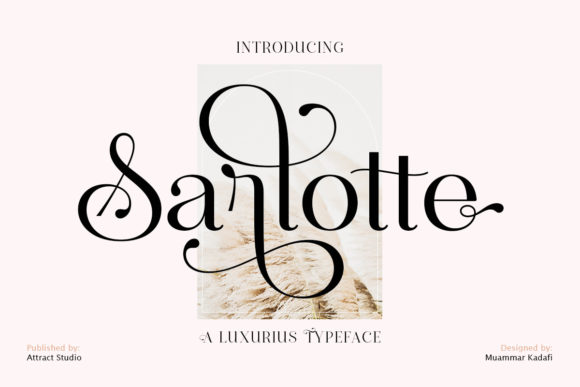
Sarlotte: A Font That Elevates Your Visual Storytelling
If you're looking for a font that brings elegance and character to your designs, Sarlotte is worth considering. This stylish display typeface blends modern aesthetics with a touch of vintage charm, making it versatile enough to suit a wide range of creative and professional projects. Whether you're designing a logo for your business or adding flair to a blog post, Sarlotte can make a subtle yet powerful impact.
What Makes Sarlotte Unique?
Sarlotte stands out because of its balanced design — it's bold enough to command attention but refined enough to feel sophisticated. Its slightly slanted letters and decorative serifs give it a dynamic edge without being overly ornate. Unlike generic sans-serif fonts, Sarlotte adds personality to your content, helping your message stand out in a visually crowded world.
This font isn't just about looks. It’s crafted with readability in mind, especially at larger sizes. The spacing between characters and the overall structure are designed to guide the eye smoothly, which is crucial when using display fonts in real-world applications like signage or headlines.
1. Branding and Logo Design
Entrepreneurs and small business owners often spend hours choosing the perfect logo. Sarlotte offers a unique visual identity that can help your brand feel more memorable. For example, a boutique coffee shop might use Sarlotte in their logo to evoke a sense of warmth and craftsmanship. The font’s legibility ensures that even from a distance, customers can recognize the brand name clearly.
Freelance designers love Sarlotte for its adaptability. You can pair it with simpler supporting fonts to create contrast and hierarchy, ensuring that the main brand message is always the focal point. Just be sure to test how it looks across different mediums — from digital storefronts to printed menus.
2. Social Media and Online Ads
In today’s fast-paced digital environment, your text needs to grab attention quickly. Sarlotte is excellent for creating eye-catching headlines in social media posts, banners, or ads. Marketers can use it to highlight key phrases in campaigns, such as "Limited Time Offer" or "Join Our Journey," giving them a polished look that aligns with high-end branding efforts.
One practical tip is to use Sarlotte sparingly in long paragraphs. Since it's a display font, it works best for short bursts of text. For instance, using it in Instagram Stories for a call-to-action like “Shop Now” can increase engagement by making the message more inviting and distinct.
3. Invitations and Greeting Cards
Wedding planners, event organizers, and graphic designers know that typography plays a big role in setting the tone. Sarlotte is ideal for invitations, thank-you cards, and greeting cards where a personal touch matters. Its elegant curves and subtle details make it perfect for handwritten-style messages or titles that need to feel warm and heartfelt.
Imagine a birthday invitation where the guest of honor’s name is styled in Sarlotte. It instantly adds a layer of sophistication while still feeling approachable. You can also use it in conjunction with softer script fonts for accents, creating a layered, artistic effect that feels handcrafted.
4. Print Projects and Photo Albums
Photo albums, calendars, and posters benefit greatly from Sarlotte’s ability to blend into both minimalist and elaborate layouts. Educators, for example, might use it in classroom decorations or yearbook headings to create a welcoming atmosphere. Hobbyists working on scrapbooks or travel journals can use it to title pages or emphasize certain memories, enhancing the storytelling experience.
When used in print, Sarlotte maintains its clarity even in smaller sizes, which is great for captions or labels. But again, avoid overusing it in dense text blocks. Instead, let it shine in headers, titles, or quotes to draw the viewer’s eye naturally through the layout.
5. Website Headers and Blog Titles
Bloggers and website creators can leverage Sarlotte to make their content more engaging. Think of a lifestyle blog where each post is titled in Sarlotte. The font helps break up the monotony of standard web typography and gives each article a fresh, curated look. It’s especially effective for niches like fashion, food, or wellness where aesthetics matter.
However, keep in mind that not all screen sizes will render display fonts perfectly. Always check how Sarlotte looks on mobile devices before finalizing a design. Pairing it with a clean sans-serif body font can help maintain balance and ensure a seamless reading experience.
Who Can Benefit Most from Sarlotte?
Sarlotte isn’t just for designers. Here’s how different types of users can incorporate it into their workflows:
- Marketers: Use Sarlotte in promotional materials to create a sense of urgency or exclusivity. It’s great for slogans or taglines that need to resonate emotionally.
- Entrepreneurs: Add it to product packaging, storefront signs, or branded merchandise for a cohesive and stylish look.
- Bloggers & Publishers: Highlight section headers or pull quotes to add visual interest and improve content scannability.
- Educators: Create engaging classroom posters, welcome boards, or project displays that inspire creativity and curiosity.
- Freelancers: Showcase your portfolio or client presentations with a font that speaks to your attention to detail and design sensibility.
How to Choose When to Use Sarlotte
Before downloading or purchasing Sarlotte, consider the purpose of your project. Ask yourself these questions:
- Does the font match the tone and style I want to convey? Sarlotte leans toward the elegant and modern, so it may not fit every theme.
- Will it work well with my existing color palette and imagery? Display fonts can either complement or clash with visuals if not chosen carefully.
- Am I using it in the right context? Sarlotte is not ideal for large amounts of body text, but it excels in headlines, logos, and decorative elements.
Also, think about accessibility. While Sarlotte is highly readable at larger sizes, it’s important to ensure that contrast ratios and sizing meet web standards if you’re using it online. Test it across platforms and devices to confirm it performs well in all scenarios.
Getting Started with Sarlotte
Once you’ve decided Sarlotte is the right choice, the next step is to integrate it into your workflow. If you're using Adobe Creative Suite or other design tools, install the font and experiment with how it interacts with your layout. Try adjusting the letter spacing or line height to enhance its natural rhythm.
For digital projects, ensure that the font file is properly embedded so that it displays correctly across browsers. Many font providers offer web-ready versions of Sarlotte with licensing options tailored for online use. Always double-check the usage rights to avoid any legal issues, especially if you're working with clients or commercial products.
Why People Love Sarlotte
Users consistently praise Sarlotte for its versatility and aesthetic appeal. One common feedback is how it elevates otherwise plain designs without overpowering them. Another favorite aspect is how easy it is to customize; many find it pairs beautifully with contrasting colors or textures, allowing for creative freedom without sacrificing professionalism.
Real-life examples include a local bookstore that uses Sarlotte for their window displays, a fitness influencer who styles her YouTube thumbnails with it, and a nonprofit organization that incorporated it into their annual report for a more approachable yet authoritative look. In each case, Sarlotte helped reinforce the brand voice and made the content more engaging.
Final Thoughts on Using Sarlotte Effectively
Sarlotte is more than just a pretty font — it’s a tool that can shape how people perceive your message. By understanding where and when to apply it, you can enhance the visual appeal of your projects while maintaining functionality. Whether you're designing for business or pleasure, this font can bring a new level of sophistication to your work.
So go ahead, try it out. See how Sarlotte transforms your next design from ordinary to extraordinary. Just remember to use it thoughtfully and intentionally, letting it serve the story you want to tell rather than distract from it.