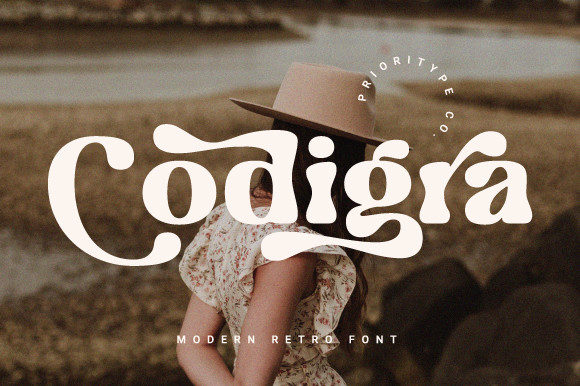
Codigra: The Bold, Wavy Display Font That Elevates Visual Branding
Choosing the right font for your design can make all the difference in how your brand or message is perceived. For those looking to add a touch of retro flair and dynamic character to their projects, Codigra stands out as a bold display font with a unique wavy style. Designed to capture attention, it’s particularly well-suited for logos, posters, and other branding materials where personality and visual impact matter most.
What Is Codigra?
Codigra is a modern display typeface that blends the nostalgic charm of vintage typography with contemporary design elements. Its standout features include flowing, wavy letterforms and alternative glyphs that offer creative flexibility. As a PUA-encoded font, it allows designers to access special characters and swashes effortlessly, making it ideal for custom branding work and eye-catching headlines.
Whether you're an entrepreneur designing a logo for a new venture, a marketer creating promotional materials, or a content creator working on a blog post layout, Codigra brings a distinctive look that can help your project stand out from the crowd.
Why Designers Choose Codigra
- Bold Visual Impact: With its thick strokes and dramatic curves, Codigra commands attention and adds a sense of energy to any composition.
- Retro Aesthetic: It evokes a vintage vibe that appeals to brands wanting to communicate nostalgia or a classic feel.
- PUA Encoding: This makes it easy to use stylistic alternates and decorative swashes without needing advanced font knowledge.
- Versatility in Display Use: Though not suitable for body text, Codigra shines in titles, headers, and signage.
Common Mistakes When Using Codigra
Despite its strengths, many designers fall into traps when using Codigra. Here are some common missteps and how to avoid them:
1. Using Codigra for Body Text
One of the biggest mistakes is trying to use Codigra in long paragraphs or body copy. Its stylized, wavy forms and lack of subtle contrast make it difficult to read at smaller sizes. This can lead to poor readability and user frustration, especially in digital formats like websites or mobile apps.
Better approach: Reserve Codigra for headlines, taglines, or short phrases. Pair it with a clean, legible sans-serif or serif font for body text to maintain a balance between creativity and clarity.
2. Ignoring Color and Background Contrast
Codigra’s strong presence means it doesn’t always play nicely with every color or background. Using it on a dark or overly busy backdrop can reduce its visual appeal and make it hard to distinguish key details like swashes or ligatures.
Better approach: Always test Codigra against different backgrounds and color schemes before finalizing a design. A high-contrast pairing—like white text on black or dark blue on light gray—often works best to highlight its intricate details.
3. Overlooking Spacing and Kerning Adjustments
The wavy nature of Codigra can sometimes lead to uneven spacing between letters if not carefully adjusted. This is especially true when combining multiple styles or using alternate characters. Poor kerning can disrupt the rhythm of your design and make it appear unpolished.
Better approach: After applying Codigra to your design, zoom in and manually adjust the spacing between characters. Tools like Adobe Illustrator or Photoshop allow precise control over letter spacing, ensuring your text looks balanced and professional.
4. Misusing Alternative Characters Without Purpose
Codigra comes with a range of alternative characters and swashes, which can be tempting to use everywhere. However, overloading a design with too many variations can create clutter and confuse the viewer. These stylistic options should enhance—not overwhelm—the message.
Better approach: Selectively use alternate characters to emphasize key words or phrases. Apply swashes only where they contribute to the overall aesthetic, such as in a logo or a call-to-action headline.
How to Evaluate Codigra Before Committing
Before downloading or purchasing Codigra, there are several factors you should consider to ensure it aligns with your needs and goals:
- Check Licensing Terms: Make sure you understand what you’re allowed to do with Codigra. Some fonts have restrictions on commercial use, web embedding, or redistribution. Always verify the license agreement matches your intended application.
- Test It in Real Context: Don’t just rely on sample text. Download a trial version and see how Codigra looks in your actual project. How does it scale? Does it hold up across different devices and screen resolutions?
- Consider Your Brand Identity: Ask yourself whether Codigra’s retro and bold style complements your brand’s tone and values. If your brand leans more minimalistic or modern, this might not be the best fit.
- Look at Support and Updates: Ensure the font creator offers good support and has a track record of updating their typefaces. This is important if you plan to use Codigra for ongoing projects or need technical assistance.
Realistic Examples of Good and Bad Usage
Bad Example: A local bakery uses Codigra for all text on their website, including menu items and product descriptions. While the header looks great, the rest of the site becomes visually overwhelming and difficult to read, leading to higher bounce rates and fewer sales.
Good Example: A vintage vinyl record store uses Codigra for their logo and event banners. They pair it with a simple, neutral sans-serif for body text and keep the color palette consistent. The result is a cohesive, stylish brand identity that resonates with customers and enhances their experience.
Comparing Codigra to Other Display Fonts
While there are many display fonts available, few combine the retro feel with the dynamic flow of Codigra. Let’s compare it to two popular alternatives:
Codigra vs. Bebas Neue
Bebas Neue is another bold, sans-serif display font known for its simplicity and geometric shapes. Unlike Codigra, it lacks the wavy motion and alternative glyphs that make Codigra so expressive. If you want something straightforward and modern, Bebas Neue is a solid choice. But if you're aiming for a vintage-inspired, artistic feel, Codigra will deliver more personality.
Codigra vs. Brush Script
Brush Script is a cursive-style font that mimics hand-painted lettering. It's fluid and organic, much like Codigra, but tends to be less structured. Codigra strikes a balance between brush-like movement and typographic precision, making it easier to read while still maintaining a unique flair.
In both cases, Codigra offers a compelling middle ground—bold enough to grab attention yet refined enough to maintain professionalism in branding contexts.
How to Get the Most Out of Codigra
To maximize the effectiveness of Codigra in your designs, follow these practical tips:
- Use it Sparingly: Limit its use to key visual elements. Too much of anything—even a beautiful font—can dilute its impact.
- Pair with Simplicity: Combine it with minimalist layouts or simple graphics to let the font shine without competing for attention.
- Experiment with Layouts: Try rotating the text slightly or layering it behind a transparent gradient to give your design a three-dimensional effect.
- Ensure Proper File Formats: Always download the correct file format (OTF, TTF) depending on your software and platform. This ensures compatibility and smooth rendering.
Where to Find and Buy Codigra
If you're ready to incorporate Codigra into your design toolkit, you can find it on reputable font marketplaces like FontBundles, MyFonts, or FontSpring. Always check customer reviews and preview pages before purchasing to confirm the font meets your expectations.
Final Thoughts on Choosing the Right Font
Fonts like Codigra are powerful tools when used correctly. They can transform a simple design into something memorable and impactful. However, understanding when and how to apply them is crucial. Avoid the temptation to overuse or misuse this typeface, and always consider the context and audience of your design.
By being mindful of common pitfalls and leveraging Codigra’s strengths thoughtfully, you’ll create visuals that are not only aesthetically pleasing but also functionally effective. Whether you're launching a new brand or refreshing an old one, the right font choice can set the tone—and Codigra is ready to help you make a bold statement.